Introduction to Docker

What is Docker, Why We Use It, and How It Actually Solves Real Problems
Modern software doesn’t fail because of bad code.
It fails because environments change.
A project that works perfectly on one machine suddenly breaks on another.
Different OS, different backend version, different database version — same code, different result.
This is the exact problem Docker was created to solve.
In this blog, I’ll explain Docker from first principles:
What Docker is
Why we need it
Virtualization vs Containerization
How Docker works logically
Real-world analogy
This is not theory — it’s how Docker is used in real engineering teams.
🔹 The Real Problem (Before Docker)
Imagine this scenario:
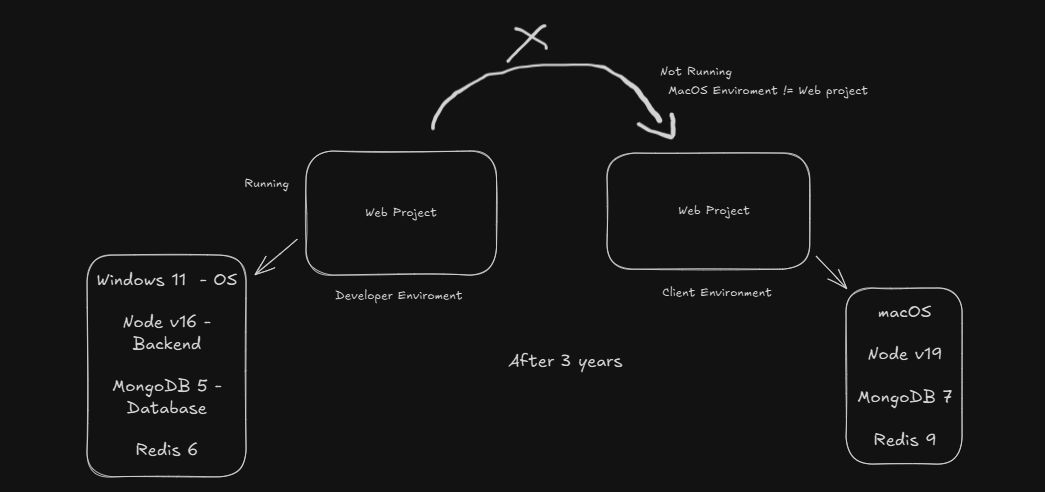
Developer machine
Windows 11 - OS
Node v16 - Backend
MongoDB 5 - Database
Redis 6
The web project runs perfectly.
After 3 years:
Client / another developer machine
macOS
Node v19
MongoDB 7
Redis 9
Same code.
But now the app breaks or behaves differently.
This is the famous “works on my machine” problem.
🔹 What is Docker?
Docker is a tool that lets developers package their application along with its exact environment into a single unit called a container.
This container includes:
Application code
Required runtime (Node, Java, Python, etc.)
Dependencies
OS-level libraries
So instead of installing Node, Mongo, Redis separately on every system, Docker says:
“Run everything inside the same environment, everywhere.”
🔹 Why We Use Docker
Docker exists to solve environment inconsistency.
With Docker:
The same app runs on Windows, macOS, Linux, and cloud servers
OS upgrades don’t break your app
New developers can run the project in minutes
Production behaves like development
In simple terms:
Docker freezes your app’s environment in time.
🔹 A Simple Analogy (Very Important)
Think of this like food:
Recipe = Dockerfile
Packed meal = Docker Image
Eating the meal = Docker Container
You don’t give people your kitchen (laptop).
You give them the packed meal (image).
They can eat it anywhere.
🔹 Virtualization vs Containerization
Before Docker, we used Virtual Machines (VMs).
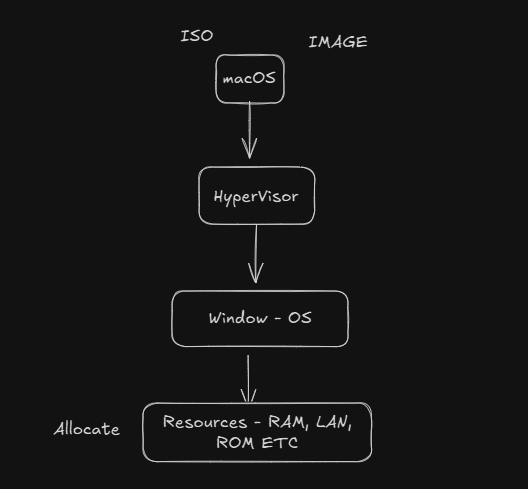
🖥️ Virtualization (Old Way)
In virtualization:
A hypervisor runs multiple full operating systems
Each VM has its own OS, kernel, libraries
Very heavy and slow
Structure:
Hardware
→ Host OS
→ Hypervisor
→ Guest OS (Windows / Linux / macOS)
→ Application
Each VM eats a lot of RAM and CPU.
📦 Containerization (Docker Way)
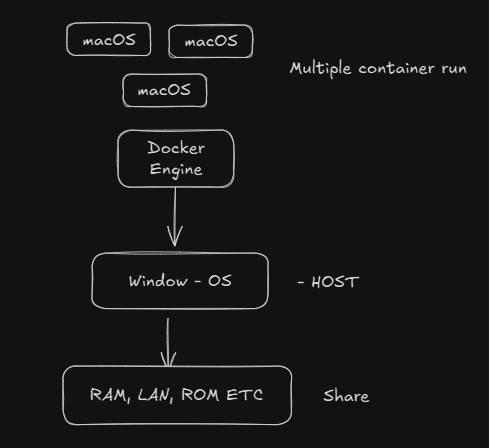
Containers are different:
No full OS inside
Containers share the host OS kernel
Extremely lightweight
Start in seconds
Structure:
Hardware
→ Host OS
→ Docker Engine
→ Containers (App + runtime)
🔹 Important Truth (Many People Miss This)
❌ Containers do NOT include Windows or macOS
✅ Containers usually run on Linux
Even on Windows or Mac:
Docker runs a small Linux VM internally
All containers run on Linux
That’s why the same container works everywhere.
🔹 Final Thoughts
Docker Solve Environment mismatch issues
Containers are lightweight and fast
Each VM has its own OS, kernel, libraries, that's why it's very heavy to run multiple VMs in same system


